
Hey mama, being a working mom means you juggle work deadlines, school runs, and meal prep every single day. Productivity tools for moms are not fancy extras; they are your lifeline to get through the chaos without breaking. Without them, stress builds fast, things slip through the cracks, and guilt hits hard for missing kid moments or work tasks that pile up.
This guide is all about the best tools for managing time made for working moms like you. We’ll talk calendars, task trackers, and more to keep your world spinning smoothly. Ready to take back your day?
Let’s jump in and see how these tools for managing time can change everything for you.
What Are Tools for Managing Time?
Time management tools are convenient applications and digital assistants that will keep your task schedules and reminders organized. They are more effective than sticky notes, as they have notifications, inter-platform, and sharing capabilities. For working moms, tools for managing time cut down on the mental burden of remembering everything during busy days.
You stop worrying about groceries while on a work call thanks to smart reminders and shared lists. As a result, tools for managing time save you time, prevent overlaps, and give you more focus for family and job duties.
Why Time Management Is Important for Working Moms?
Working moms juggle nonstop tasks from morning until night without any real breaks. You pack lunches, join early Zoom calls, and handle school meetings all before noon. Afternoons bring client talks, school pickups, and sports activities that keep you on the go. Also, evenings include homework, dinner, bedtime stories, and maybe one final work email.
Poor time management leads to missed deadlines, forgotten events, fatigue, and strained family relationships. Also, studies show that poor time management leads to burnout and stress among working parents. But good tools for managing time turn chaos into smooth days with less worry, and you finish work faster, be present for your kids, reduce stress, and enjoy guilt-free time for yourself. You can also explore our tips for time management for working mothers to make each day run more smoothly.
Solid tools for managing time cut worry, lift confidence, and show kids smart habits they can use. It is not about more tasks; it is about key ones without chaos taking over your life.
Top Tools for Managing Time for Working Moms

Online tools for managing time fit different needs to blend family and work life seamlessly. We look at calendars, trackers, and other productivity apps for busy parents.
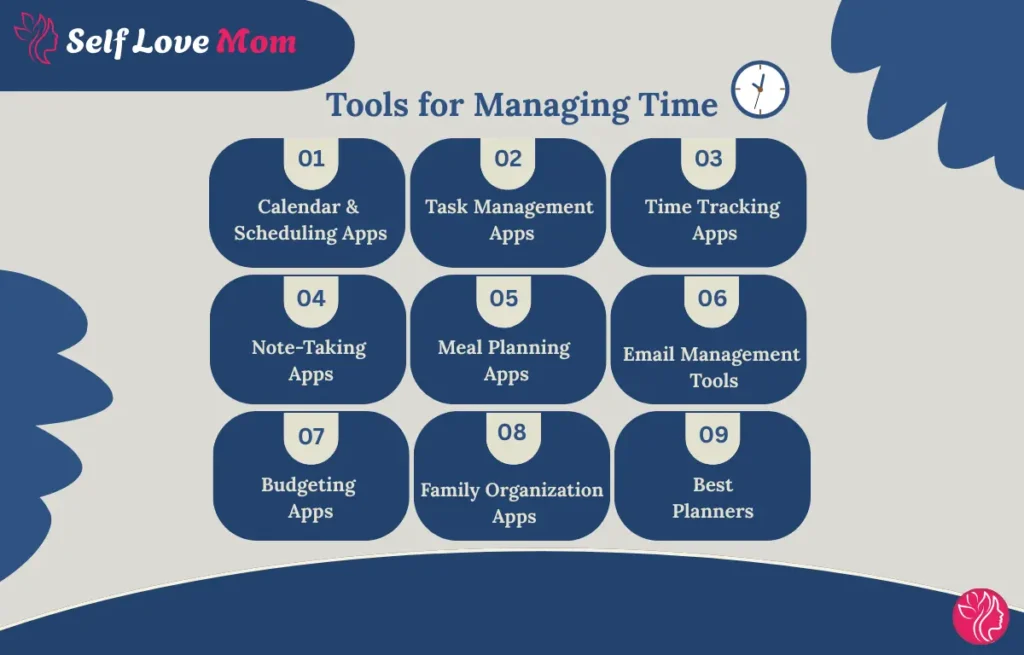
1. Best Calendar & Scheduling Apps
Stop trying to remember everything in your head to avoid extra stress. These tools for managing time organize appointments, events, and tasks in one spot.
- Google Calendar is free and syncs events on all your devices with color codes for work and family. It handles repeating tasks like pickups or meetings without any confusion. With this, you never double-book and stay fully prepared for both home and office demands.
- Motion is an AI-powered scheduling app that combines multiple calendars into one smart view and adjusts plans when things change. You can add events by typing simple phrases like doctor visit Friday at 3 PM. Motion helps you prevent constant app switching and keeps your day on track.
- Outlook Calendar integrates with Microsoft tools to create events from emails and share with family or team. It offers focus modes to block distractions during work or family dinner time. Outlook Calendar supports professional planning while guarding your personal hours well.
2. Best Task Management Apps
Drowning in to-dos? These apps shift the disorder to calm with intelligent lists, priorities, and friendly prompts.
- Todoist creates separate sections for work and home to stay organized. You add tasks using natural language, set priorities, and share with your partner quickly. Todoist breaks big chores into easy steps and feels rewarding to check off.
- TickTick is a to-do list that uses visual boards where you drag tasks from start to finish, like digital notes. Family can join in, and kids have fun moving their chore cards around. TickTick adapts to your lifestyle and makes household duties a team effort.
- Sunsama links tasks to your calendar, sets deadlines, and shows progress in a clear view. It handles routines like weekly cleaning without you forgetting anything. Sunsama guides you through work projects and home chores with steady focus.
3. Best Time Tracking Apps
Wonder where your day went? These tools for managing time show you and protect your focus.
- Toggl Track uses a simple timer for activities like emails or cooking sessions. It provides reports to spot when work invades family time for better boundaries. Toggl Track helps you reclaim lost time for what matters most.
- RescueTime tracks apps and sites in the background to separate work from home tasks automatically. You receive weekly summaries and log time even on the go. RescueTime aids remote moms in balancing paid work with family responsibilities smoothly.
- Everhour combines timers with invoicing to track client hours and set budgets to prevent burnout. It connects directly to calendars for alerts on upcoming deadlines. Everhour keeps work commitments in line without spilling into personal life.
4. Best Note-Taking Apps
Ideas slipping away? These apps catch them and keep your mind clear.
- Evernote scans receipts, saves articles, and tags items for quick searches like recipes or forms. It syncs on phone and computer for notes during school waits. Evernote serves as your extra brain, securely holding all your thoughts.
- OneNote lets you easily build digital notebooks with sections for typing, drawing, or voice memos. It shares pages with family and links to calendars for lists or plans. OneNote organizes scattered ideas into a handy binder you access from anywhere.
- Notion lets you create custom pages for journals, schedules, or work using drag-and-drop templates. Also, it includes databases, checklists, and more in one flexible space. Notion becomes your central hub for personal and professional organization.
5. Best Meal Planning Apps
Dinner panic? These applications curate recipes, compile lists, and align with dietary requirements.
- Mealime scans your pantry and preferences to suggest quick recipes under 30 minutes with auto-generated shopping lists. It filters for allergies and saves favorites for faster weeknight decisions. Mealime cuts dinner stress and keeps healthy eating simple for the whole family.
- Plan to Eat Lock imports recipes from any website, drags them into a weekly calendar, and scales portions for your family size. It remembers what you like and builds grocery lists in one click. Plan to Eat makes batch cooking budget-friendly and routine.
- Yummly creates full meal recipes based on calorie or macro diets and adjusts serving sizes for each person. Shopping lists appear instantly ready for your store run. Yummly supports health goals while handling varied family tastes smoothly.
6. Best Email Management Tools

Inbox overwhelming? These tools sort and declutter so you can focus on what matters.
- Clean Email groups similar messages so you unsubscribe or archive hundreds at once with smart folders for newsletters. It clears spam fast and keeps only important emails visible. Clean Email frees your mind from digital clutter every morning.
- SaneBox uses AI to move low-priority emails into separate folders and sends daily digests instead of constant pings. You snooze messages or set follow-ups without losing track. SaneBox protects family evenings from work notifications completely.
- Missive combines team chat, email, and tasks in one fast interface with keyboard shortcuts and AI summaries. Work and personal inboxes stay separate but connected to your calendar. Missive speeds up heavy email days for executive moms dramatically.
7. Best Budgeting Apps
Money worries add stress? These apps track spending and plan ahead for peace of mind.
- YNAB connects your bank accounts, assigns every dollar a job, and sends bill reminders before due dates. It teaches proactive spending to build savings without stress. YNAB brings clarity and confidence to household finances.
- Goodbudget works like digital envelopes, where you allocate money to groceries, rent, or fun, and track spending together as a couple. It forecasts future bills and gently cuts unnecessary costs. Goodbudget aligns family goals with everyday choices.
- PocketGuard shows your net worth in one dashboard, finds hidden subscriptions, and suggests savings with custom categories. You and your partner collaborate in real time on budgets. PocketGuard turns money management into a shared, simple habit.
8. Best Family Organization Apps
Unified family visibility prevents oversights. These tools for managing time with family coordinate collective schedules.
- Cozi shares one color-coded calendar for the whole family, plus to-do lists, shopping lists, and meal plans that everyone can edit. Add milk from your phone or pull dinner recipes instantly. Cozi turns daily logistics into smooth teamwork for everyone.
- FamilyWall adds chat polls and locations to each event so co-parents or grandparents stay updated without overload. It keeps communication clear and focused on what matters. FamilyWall simplifies extended family coordination effortlessly.
- TimeTree tracks who is where, assigns chores with fun rewards, and stores important papers securely. Kids love checking off tasks and earning points together. TimeTree brings harmony and accountability to busy households.
9. Best Planners for Working Moms
Physical or hybrid planners provide structure when digital feels overwhelming. These tools for managing time blend analog touch with smart features.
- Day Designer combines a beautiful daily layout with goal-setting pages, hourly schedules, and to-do sections in one premium planner. You map out work blocks, family events, and self-care visually on paper each morning. Day Designer gives a mindful start and satisfying end to every day.
- Passion Planner offers weekly spreads with passion roadmaps, good things lists, and reflection prompts to align big goals with daily actions. It includes stickers and undated options for flexible starts anytime. Passion Planner keeps motivation high while organizing mom life step by step.
- Happy Planner lets you customize discs with wellness finance or mom-specific inserts, plus colorful stickers for fun tracking. Snap in meal plans or habit pages and rearrange as needs change. Happy Planner makes planning creative and adaptable for busy seasons.
How to Choose the Right Tools for Managing Time for You?
Not all tools for managing time fit every mom. Ask yourself a few questions to make a wise choice.
- Stressed by too many emails or meetings? Try tools for managing time, like Google Calendar or Outlook, for plans and reminders.
- Forget appointments or school events? Use tools to help time management, like Cozi or Todoist, for alerts and lists.
- Family schedules clash? Pick the best organization tools for work, like Cozi or Trello—everyone sees updates in one spot.
- New to tech? Start with simple time management tools like Google Keep or Any.do—easy and free.
- Love customizing? Go for flexible scheduling for personal time management, like Notion or ClickUp—tweak layouts and colors as needed.
- Use multiple devices? Choose working mom apps like Evernote or Todoist—syncs phone, laptop, tablet.
- On a budget? Many tools to manage time are free, like Trello, Google Calendar, and Todoist—upgrade later for extras.
Try one tool at a time for a week. If it doesn’t click, switch. The best tools for managing time make you feel calm, clear, and in control.
How to Stay Consistent with Time Management?
Staying consistent with time management can seem tough, especially for busy working moms with packed days. Here are useful tips to help you maintain your plan and form lasting habits through tools for managing time.
- Create a Routine: Follow a daily routine with planned tasks, using your daily schedule to improve structure and rhythm. You can download our time management working mom daily schedule checklist.
- Start Small: Begin with only a few key tasks each day before adding more to prevent overload with online tools for time management.
- Stay Accountable: Share your schedule with a reliable person to stay on course using AI tools for time management for soft encouragement.
- Build Habits: Pick a regular time daily to review your schedule and follow it with ways to manage time more effectively.
- Celebrate Wins: Recognize finished tasks to remain motivated and upbeat with tools for managing time through the week.

Final Thoughts on Tools for Managing Time
Being a working mom is a nonstop juggling act, but the right tools for managing time smooth out the day and ease stress. Apps like Google Calendar, Todoist, Cozi, and Notion keep you organized, save those valuable minutes, and deliver real balance between work and home.
Remember, you do not need to tackle everything at once. Start small, try one tool, and grow from there at your own pace. Every little step toward smarter time planning brings extra peace, sharper focus, and happier moments with your loved ones. You have got this, mama. Balance is completely achievable with the right tools for managing time right by your side daily.